West Five Stand is setup for easy operations by anyone. We have made it easy to have your own 5-Stand Shooting just like sporting clays but wiht 6 targets. All throwers are ready to operate. Controller Instructions Below. Voice Instruction as well. This allows you to shoot as a group or practice by yourself. Watch the newletter for training dates. Like all of our fields we encourge you to use the Longrange Cards to allow you to shoot from 8:00 to dusk.
Using the West 5-Stand

Here is the step-by-step process to retrieve the MT4300 cart from the High Skeet House 1 and set it up for manual operation on the West 5-Stand field.
Step 1: Accessing High Skeet House 1
To get to the equipment cart, you will need to open the lower storage level of the High Skeet House on Field 1.
- Key Lock Box: Get the Field Keys out of Lock Box on light pole of field 1. Use the club’s standard 3-digit lock combination
- Locate the Padlock: Go to the access door on the lower level of High Skeet House 1.
- Open the Lock: Use the padlock key to open the lock. Remove padlock and slide hasp to allow door to open. Hang padlock in the hook inside the building.
- Roll Out the Cart: Open the door fully, unplug the controller if it is charging and carefully roll the 5-Stand cart out. Ensure the wireless antenna attached to the cart assembly doesn’t bump the door frame. Lock the door back up if you are heading straight to the West field and return the keys to the lock box.
Step 2: Setting Up on the West 5-Stand Field
Once the cart is positioned at the West 5-Stand field control station, get the MT4300 controller ready for action.
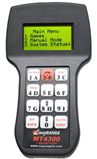
Long Range MT4300 Controller.
- Power On: Press and hold the ON / BACK button on the keypad until the digital screen lights up.
- Load Rounds: Load Rounds from your LongRange 5- Stand card. Press enter when all Shooter Rounds are entered to access the Main Menu
- Check the Screen: The main menu will appear on the display, showing options like 1. Games, 2. Manual Mode, or 3. System Status.
Step 3: Launching Manual Operation
Manual operation lets you throw targets instantly with a single button press—perfect for un-squaded practice, trap testing, or custom clay presentation drills on the West field.
- Select Manual Mode: From the main menu screen, press the 2 key (labeled 2B) to choose Manual Mode.
- Identify Your Traps: The keys are mapped numerically and alphabetically to match the standard 5-stand layout designations:
- Buttons 1 through 6 directly correspond to Traps 1 to 6
- Throwing Singles: Press any single button (1 through 6) to instantly fire that specific trap.
- Throwing Pairs:
- Report Pairs: Press the first target button, wait for the shooter to fire, and then press the second target button.
- True Pairs: Press the True Pair / Enter button in the bottom right corner, then press the two target buttons you want to throw simultaneously, and press Enter again to fire.
MT 4300 Voice Mode
Here is how to set up and use the Voice Control feature with the MT4300 controller for hands-free or solo shooting on the West 5-Stand field.
The voice release system uses the Long Range internal microphone allowing a shooter’s vocal command (“Pull!”) to instantly fire the traps.
Step 1: Activating Voice Mode on the Controller
- Enter the Menu: From the main screen, use the arrow keys or keypad to navigate Voice Release Mode (Option 5 on main menu).
- Toggle Voice On: Select Voice Control: ON by choosing option 5 of Main Menu. Choosing option 5 again turns it off.
Step 2: Operating with Voice Control
Once activated, the system needs to be “armed” for every shot sequence to prevent background noise or closing gun actions from accidentally throwing targets.
- Throwing Singles: Press any single button (1 through 6) to arm that specific trap.
- Throwing Pairs:
- Report Pairs: Press the first target button, and then press the second target button to arm the specific traps. After the release of the first bird the second bird will be released on the sound of the gun report.
- True Pairs: Press the True Pair / Enter button in the bottom right corner, then press the two target buttons you want to throw simultaneously, and press Enter again to arm.
- Calling for the Target: Call “Pull!” clearly. The microphone will detect the sound frequencies and instantly fire the selected manual trap or the next target in the pre-loaded 5-stand sequence.
- The “Dead Mic” Feature: After a target is thrown and a shot is fired, the controller automatically shuts off the microphone for a brief window (usually 3-4 seconds). This ensures the sound of the actual gunshot or the spent shell ejecting doesn’t accidentally trigger a second, unwanted target.
- Pro Tip: To aid the next group of Shooters insure that the Voice Mode is turned off and verify on Main Menu 5 that Voice is off.
